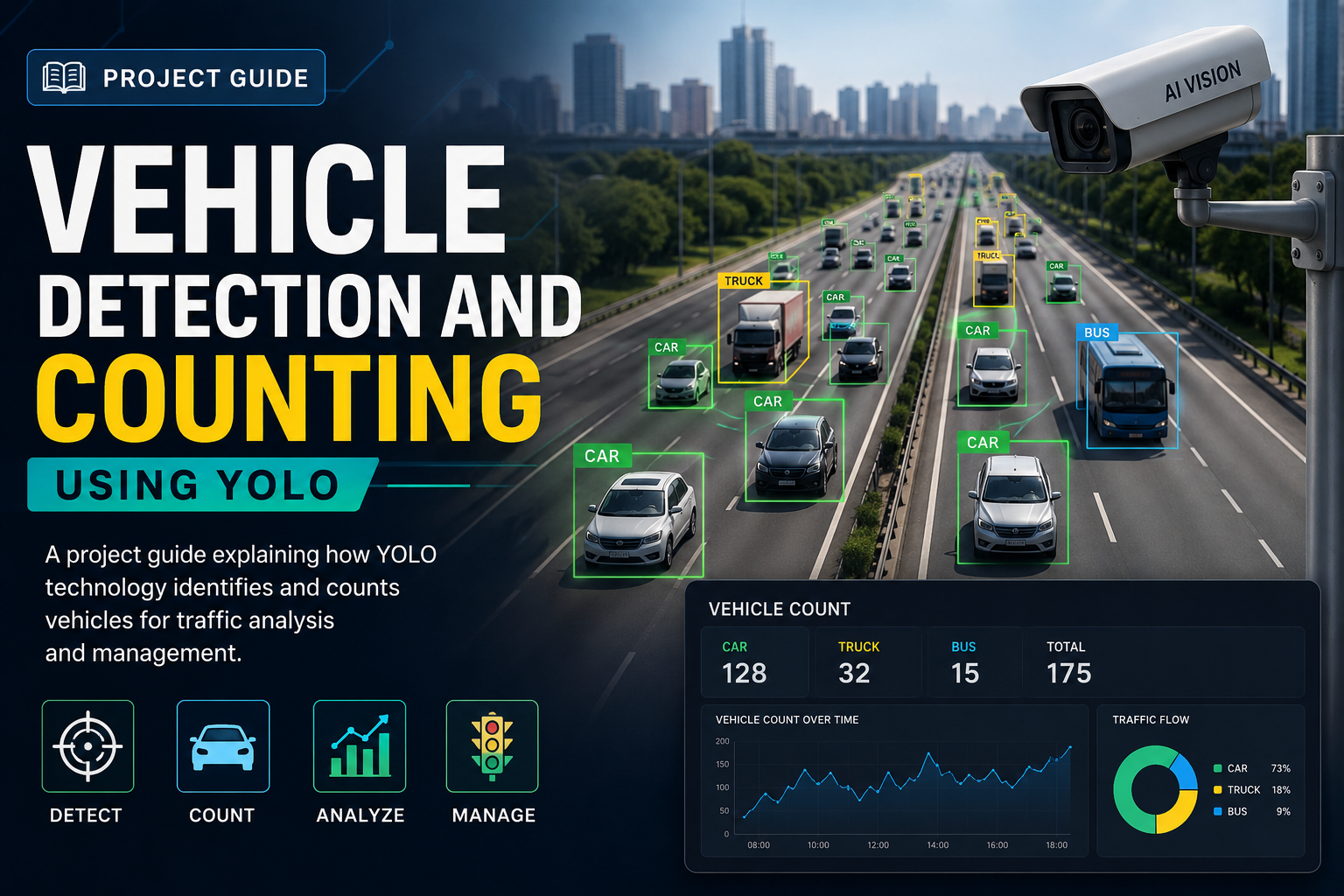
Are you looking to build a smart system that can detect and count vehicles accurately and quickly? Imagine having the power to monitor traffic flow, manage parking lots, or even enhance road safety—all with just one project.
In this guide, you’ll discover how to use YOLO, one of the fastest and most reliable object detection models, to create a complete vehicle detection and counting system. Whether you’re a beginner or someone with some coding experience, this step-by-step guide will walk you through everything you need to know.
Ready to transform your ideas into a working project? Keep reading, because by the end, you’ll have the tools and knowledge to make it happen.
Yolo Basics
Understanding YOLO is key to vehicle detection and counting projects. YOLO stands for “You Only Look Once.” It is a fast and accurate method for object detection. This section explains the basics of YOLO and how it works for vehicle detection.
YOLO processes images quickly, making it suitable for real-time applications. It detects multiple objects in one pass. This speed helps count vehicles efficiently on busy roads.
What Is Yolo?
YOLO is an object detection algorithm. It identifies and locates objects in images or videos. Unlike older methods, YOLO looks at the whole image once. This approach speeds up detection and reduces errors.
YOLO labels each object with a bounding box and class name. It can detect many object types, including cars, trucks, and buses. This makes YOLO perfect for vehicle detection tasks.
How Yolo Works
YOLO divides an image into a grid. Each grid cell predicts bounding boxes and object probabilities. It combines these predictions to find all objects in the image.
The algorithm uses a single neural network. It processes the entire image and outputs detections directly. This method makes YOLO faster than other detectors that scan the image multiple times.
YOLO balances speed and accuracy. It works well on videos and live camera feeds. This helps in counting moving vehicles in real-time.
Versions Of Yolo
YOLO has many versions, each improving speed and accuracy. YOLOv1 started the trend with a simple design. YOLOv2 and YOLOv3 added better detection for small objects.
YOLOv4 and YOLOv5 improved speed for real-time use. The latest versions support more vehicle types and complex scenes. Choosing the right version depends on your project’s needs.
Setting Up The Environment
Setting up the environment is the first step in building a vehicle detection and counting system using YOLO. It prepares your computer to run the project smoothly. This stage involves gathering the right hardware and software, installing essential tools, and configuring your workspace. Careful setup reduces errors during development and testing.
Required Hardware And Software
You need a computer with a good GPU for faster processing. At least 8GB of RAM is recommended. A webcam or a video file can serve as input for vehicle detection. The software must include Python 3.6 or higher. CUDA toolkit is necessary if you use an NVIDIA GPU for acceleration.
Installing Dependencies
Install Python libraries such as OpenCV, NumPy, and PyTorch. These libraries handle image processing and neural networks. Use pip to install them by running commands in the terminal. Also, download the YOLO model weights and configuration files. These are essential for detection tasks.
Configuring The Development Environment
Set up a virtual environment to keep dependencies organized. Activate it before installing libraries. Configure the IDE or text editor for Python coding. Adjust settings to support GPU usage if available. Test the setup by running a simple YOLO detection script to verify everything works correctly.
Data Collection And Preparation
Collecting and preparing data is the first step in building a vehicle detection and counting system using YOLO. The quality of your data directly affects how well the model performs. Careful preparation ensures the model learns to identify vehicles accurately in different conditions.
This phase involves gathering images and videos, labeling them correctly, and applying techniques to increase data variety. Each part plays a key role in training a reliable YOLO model for vehicle detection.
Gathering Vehicle Images And Videos
Collect a wide range of vehicle images and videos from various sources. Use traffic cameras, dashcams, or online datasets. Capture different vehicle types, angles, and lighting conditions. More variety helps the model recognize vehicles in real-life situations.
Include images from different times of day and weather conditions. This diversity improves model robustness and accuracy.
Labeling Data For Training
Label each vehicle in the images with bounding boxes. Use annotation tools like LabelImg or VoTT for this task. Accurate labels tell the model where vehicles appear in the image.
Check each label carefully. Mistakes in labeling reduce model performance. Include all visible vehicles to avoid missing detections during training.
Data Augmentation Techniques
Apply data augmentation to increase the size and variety of the dataset. Techniques include flipping images horizontally, adjusting brightness, and adding noise. These changes help the model learn to detect vehicles under different conditions.
Augmentation reduces overfitting by exposing the model to more variations. This step is important for improving detection accuracy on new, unseen data.
Training The Yolo Model
Training the YOLO model is a key step in vehicle detection and counting projects. This process allows the model to learn from data and improve its accuracy. Proper training ensures better detection of vehicles in various conditions. It requires choosing the right version, setting parameters, running the training, and evaluating results.
Choosing The Right Yolo Version
YOLO has several versions, each with strengths. YOLOv3 is popular for good speed and accuracy. YOLOv4 offers improved performance and better results on complex data. YOLOv5 is faster and easier to use for beginners. Choose a version based on your hardware and project needs. The right version balances speed and accuracy for vehicle detection.
Configuring Training Parameters
Training parameters control how the model learns. Set batch size to manage memory during training. Learning rate affects how quickly the model updates itself. Too high a rate causes errors; too low slows learning. Define the number of epochs to determine training length. Adjust input image size for better detail. Proper configuration leads to more reliable vehicle detection.
Running The Training Process
Start training by feeding labeled vehicle images to the model. Monitor progress to check for errors or slow learning. Use a good GPU to speed up training. Save checkpoints to avoid losing progress. Training can take hours or days depending on data size and hardware. Stay patient and ensure consistent environment settings.
Evaluating Model Performance
Check the model’s accuracy using test data. Use metrics like precision, recall, and mean average precision (mAP). Good precision means fewer false detections. High recall shows most vehicles are detected. Analyze mistakes to improve training data or parameters. Evaluation helps confirm the model works well for your vehicle counting project.
Implementing Vehicle Detection
Implementing vehicle detection is a key step in building an effective traffic monitoring system. This process uses the YOLO (You Only Look Once) model to spot vehicles in images or video frames quickly. The goal is to identify cars, trucks, and motorcycles with precision. This section explains how to load the trained YOLO model, run real-time detection, and improve accuracy.
Loading The Trained Model
Start by loading the YOLO model that is already trained on vehicle images. The model file contains the weights and configuration needed for detection. Use a deep learning library like OpenCV or PyTorch to load these files. This step prepares the system to recognize vehicles in new images or videos. Loading the model correctly ensures smooth detection without errors.
Real-time Vehicle Detection
Next, set up the system to detect vehicles in live video streams or recorded footage. Capture each video frame and send it to the YOLO model for analysis. The model scans the frame and highlights vehicles with bounding boxes. This process happens fast, allowing for real-time tracking of traffic flow. Display the results with labels showing the type of vehicle detected.
Optimizing Detection Accuracy
Improving accuracy makes the system more reliable for traffic analysis. Adjust the confidence threshold to balance between missing vehicles and false detections. Use non-maximum suppression to remove overlapping boxes around the same vehicle. Training the model with more diverse vehicle images also helps. Regularly test and fine-tune settings to keep the detection sharp and precise.
Vehicle Counting Techniques
Vehicle counting is a key part of traffic management and analysis. It helps in understanding traffic flow, planning roads, and improving safety. Using YOLO for vehicle detection makes counting more accurate and faster. This section explains the main techniques for counting vehicles in video streams. Each technique plays a vital role in ensuring precise results.
Defining Counting Zones
Counting zones are specific areas where vehicles are counted. These zones are drawn on the video frame. It could be a lane, an intersection, or a road segment. Setting clear zones helps avoid counting errors. Vehicles are only counted when they cross these zones. This method simplifies the counting process and focuses on important regions.
Tracking Vehicles Across Frames
Tracking means following a vehicle as it moves through frames. It links the same vehicle from one frame to the next. This process prevents double counting. Tracking uses unique IDs for each detected vehicle. It helps count vehicles accurately even in busy traffic. Combining YOLO’s detection with tracking improves reliability.
Handling Occlusions And Overlaps
Occlusions happen when one vehicle blocks another. Overlaps occur when vehicles are very close. Both can cause counting mistakes. To handle this, the system predicts vehicle paths. It uses motion and size clues to separate vehicles. Advanced algorithms help detect hidden vehicles. This reduces errors and keeps counts precise.
Project Deployment
Deploying a vehicle detection and counting project using YOLO means making it work outside the development stage. It involves setting up the system to run in real time or on saved video files. Deployment ensures the model can handle live data and provide useful insights.
This stage requires careful planning. The project must connect smoothly with video sources. Users need an easy way to view results. Also, the system should run fast and use resources well.
Integrating With Video Streams
Connect the YOLO model to video feeds from cameras or saved files. Use libraries like OpenCV to capture and process video frames. The system should handle different video formats and resolutions. Stream processing helps detect vehicles as they appear on screen. Frame by frame analysis ensures no vehicle is missed.
Building A User Interface
Create a simple interface to display detection results. Show live video with boxes around vehicles. Include counters for different vehicle types. Use web frameworks or desktop tools for the interface. Clear visuals help users understand traffic flow quickly. The interface must update in real time without delays.
Performance Optimization
Speed up the detection process for real-time use. Use GPU acceleration to boost model inference times. Reduce model size if needed to fit device limits. Optimize video frame rate and resolution for smooth processing. Balance accuracy and speed for best results. Monitor system resources to avoid crashes or slowdowns.
Troubleshooting And Tips
Troubleshooting and tips are key for smooth vehicle detection and counting using YOLO. This section helps solve common problems. It also offers advice to improve detection quality. Plus, it shares best practices to keep your system running well.
Common Issues And Fixes
Sometimes YOLO misses vehicles or counts wrong. This happens due to low image quality or bad lighting. Fix blurry images by using a better camera or adjusting focus. Improve lighting by adding lamps or using infrared cameras at night.
Another issue is slow processing. Reduce image size or use a faster GPU. Check your code for errors that cause crashes. Update the YOLO model to the latest version for better performance.
Improving Detection In Challenging Conditions
Bad weather like rain or fog makes detection hard. Use cameras with weatherproof housing. Train YOLO with images showing these conditions. This helps the model learn to detect vehicles better.
Shadows and reflections confuse the system. Avoid placing cameras where shadows fall on the road. Use image filters to reduce glare. Adjust camera angle for clearer views.
Best Practices For Maintenance
Regularly clean camera lenses to keep images clear. Check cables and connections often to avoid interruptions. Restart your system weekly to prevent slowdowns.
Keep your software updated. Backup your data frequently to avoid loss. Test your detection system after updates to ensure accuracy.
Frequently Asked Questions
What Is Yolo In Vehicle Detection And Counting?
YOLO stands for “You Only Look Once. ” It’s a fast, accurate object detection algorithm ideal for real-time vehicle detection and counting tasks. YOLO processes images in one pass, making it efficient for traffic monitoring and management systems.
How Does Yolo Improve Vehicle Counting Accuracy?
YOLO detects multiple vehicles simultaneously with high precision. It uses deep learning to distinguish various vehicle types and minimize false counts. This leads to more reliable traffic data and better decision-making for transportation planning.
Can Yolo Handle Real-time Vehicle Detection?
Yes, YOLO is designed for real-time applications. Its single-pass detection approach processes video streams quickly, enabling live vehicle tracking and counting. This makes YOLO suitable for smart city traffic systems and surveillance.
What Data Is Needed To Train Yolo For Vehicle Detection?
Training YOLO requires a labeled dataset with vehicle images annotated by bounding boxes. Diverse vehicle types, angles, and lighting conditions improve model robustness. High-quality, well-annotated data ensures better detection and counting accuracy.
Conclusion
This project guide showed how to detect and count vehicles using YOLO. You learned each step clearly and simply. The method works well for traffic analysis and management. You can apply these ideas to many real-world problems. Practice helps improve accuracy and results.
Keep experimenting with data and settings. This skill can support smart city and road safety projects. Try building your own version to see how it performs. Vehicle detection and counting is a useful tool worth exploring.